Import clip
01
Drawing
Import and generate path
spiral-14-inch-vector.dxf
FoamCut turns customer DXF files into reliable G-code for your hot-wire cutter—optimized path, correct kerf, ready for production. Built for the part of the job that actually matters: getting from file to production without guesswork, waste, or CAM overhead.
Actual spiral workflow
The top workflow uses your real spiral example across the page: a real import-and-generate clip from the DXF, the actual simulation clip, the original cut video, and the finished product photo.
01
Import and generate path
spiral-14-inch-vector.dxf
02
Simulation preview
03
Actual video of cut
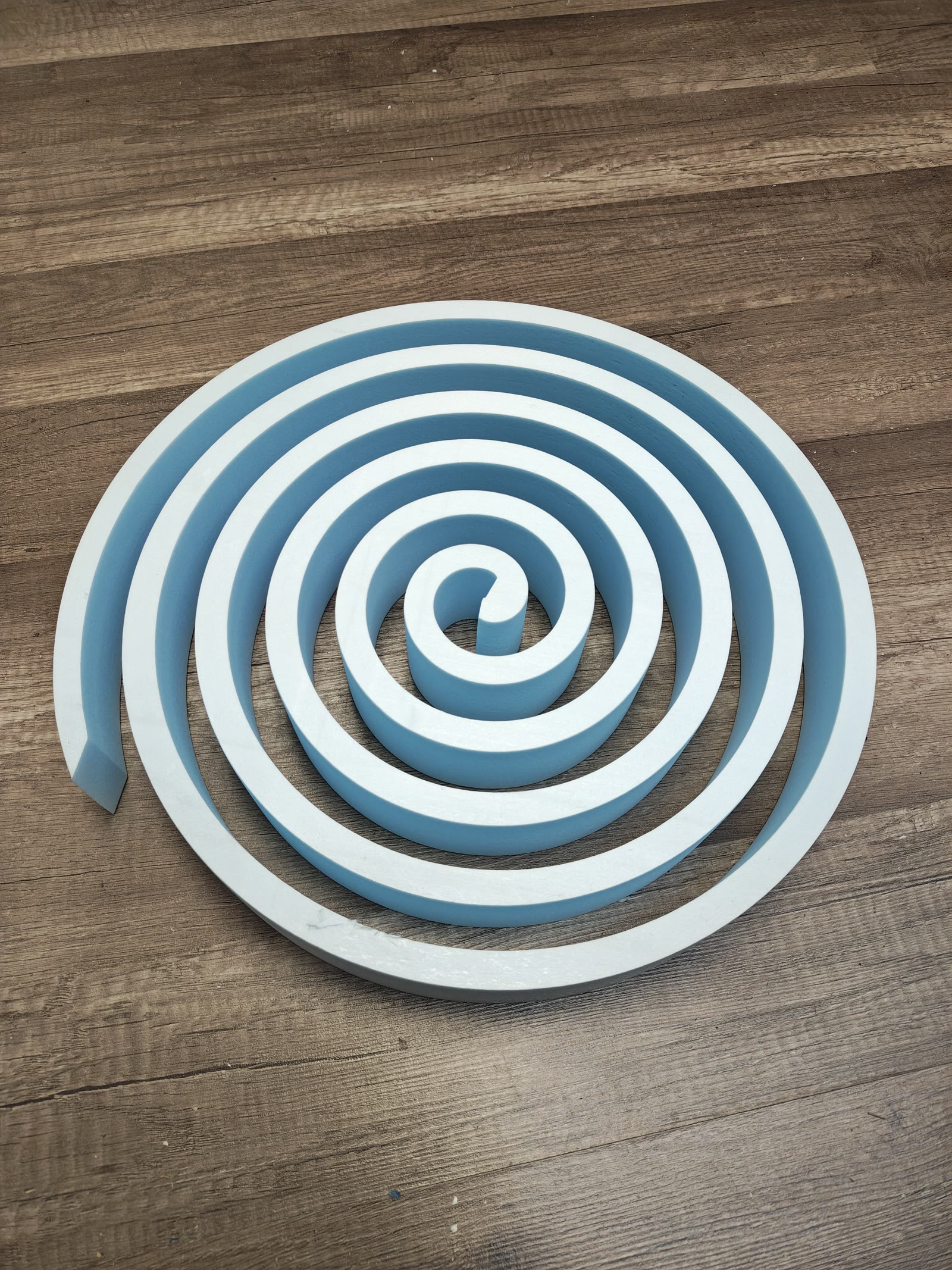
04
Finished foam part
Fast first job
Minutes, not setup days
Designed so a small shop can get from incoming file to first clean cut quickly.
Visual confidence
2D and 3D checks
Preview the path, verify offsets, and catch mistakes before foam touches wire.
Flexible deployment
Browser or offline
Run online in any browser, or install locally on Windows or macOS and keep the workflow fully inside the shop.
Watch the actual cursor path instead of a stitched marketing reel.
Follow a narrated walkthrough of the full workflow in one take.
See the exact import, optimize, preview, and export flow before you try it.
A compact look at the image import workflow: bring in a silhouette, set the target size, generate the path, and sanity-check the 3D result before you cut foam.
A quick product clip with the actual cursor flow for importing artwork, fitting it to size, and checking the 3D preview.
Introduction demo
Image tracing demo
Follow the full tracing pass: import a silhouette image, tune threshold and simplify controls, lock the final size, generate bridges and cut order, then run a quick simulation.
A quick silent clip from the image tracing workflow so you can scan the result at a glance.
Rotary showcase
This showcase uses the exact chubby fish example bundle from the TwistRot examples folder: the revolution curve, the fish body rotation curve, the twist curve, and a short README with the reproduction steps.
This short loop starts near the end of the narrated demo, where the generated figures and final rotary views read most clearly.
Example bundle
Includes every file needed to reproduce the example shown in the demo.
Runs in your browser when you want instant access, or install locally for offline shop work.
Same file, same settings, same cut every time. Save projects and machine profiles for one-click re-runs.
Optimized cutting paths and kerf compensation mean fewer ruined blanks and less scrap material.
Import a DXF from your customer, optimize once, and start cutting. No complex CAM configuration needed.
Use it online from any browser, or download the Windows installer to run it locally. No admin rights, no IT department, no configuration.
FoamCut is designed around the first few minutes after a drawing arrives: import it, fix what matters, verify the cut, and get the machine moving without fighting a heavyweight CAM stack.
Import files directly from your customers or designers. Supports DXF and SVG with automatic path detection.
TSP-based algorithm orders cuts to minimize travel time and reduce waste. Custom entry points for full control.
Automatic kerf offset ensures parts come out the exact size specified, accounting for hot-wire material removal.
Visualize your cutting path in real-time on a 2D canvas or inspect the result in a full 3D preview.
Create shapes directly: lines, polylines, circles, rectangles, ellipses, and text. Quick Draw adds typed coordinates and delta entry for fast, precise drafting.
Trace a photo into cut paths. Free includes 10 trial traces; Standard and up unlock unlimited tracing.
Export production-ready G-code for 2-axis, 4-axis (tapered), and 5th-axis (rotary) hot-wire machines. Load the file in LaserGRBL, Mach3, LinuxCNC, or your usual sender. Browser streaming to GRBL is a Premium beta.
4-axis workflows cut tapered parts with different root and tip profiles. 5th-axis workflows (rotary / TwistRot) cut lathe-style and complex 3D shapes.
Use it in your browser, or download the Windows installer to run it locally. Bundles everything it needs — no internet required after install.
Ask the built-in assistant anything about the software. Get instant answers about import, path optimization, G-code settings, and more — right inside the app.
Feature tour clip
Place text on the canvas, generate the path, drag bridge markers on inner and outer strokes, run cut simulation, and orbit the 3D block to check the cut before export.
Feature tour clip
Follow the trace workflow from importing a silhouette to tuning threshold and simplify controls, locking scale, generating bridges, and previewing the cut.
Feature tour clip
This focused shape-drawing clip covers the core left-toolbar create tools, so you can sketch cut-ready parts without starting from an imported file.
Feature tour clip
Kerf compensation lives inside machine setup alongside feed rate and units. This short clip shows where to find it and how it helps finished parts stay on size.
Feature tour clip
After Generate Path, move the machine-home widget visually, use the Set Home menu for typed offsets that mirror Machine settings, run Cut Simulation from the new start, and export G-code with updated coordinates while geometry stays the same.
Feature tour clip
Browser USB/Wi-Fi streaming to GRBL or FluidNC is in beta. This walkthrough shows the sender as a machine-control workflow: verify the connection, inspect live status, stream, pause, resume, and re-home. For production, download G-code and load it in LaserGRBL or your usual host.
Browser-fast when you want instant access, installable when you want a dedicated shop workstation, and consistent either way.
Open FoamCut from a shop PC, laptop, or demo machine and get into the workflow without waiting on a heavy install.
Pin FoamCut as a dedicated workspace on a production computer and launch it like a desktop tool.
Web access makes it easier to roll out improvements, onboard new operators, and keep support conversations aligned.
Move between computers without locking CAM work to one workstation, while still keeping a local install option for offline jobs.
Open FoamCut in your browser, start from a link, and keep your work accessible across machines on paid plans. It is the quickest way to get into a job.
Install FoamCut on a production computer for a dedicated app-like workspace and offline work between quick license check-ins.
Browser install demo
A quick walkthrough of opening FoamCut in the browser and installing it like an app.
Start free, watch the workflow, and see whether FoamCut gives your shop the faster, steadier path from drawing to cut that you need.